
How the Collector communicates with PWR: the Startup, PULL and PUSH flows
10 min read
Three detailed sequence diagrams to understand exactly how the Collector starts up, how PWR fetches reports on demand (PULL), and how the Collector reports its heartbeats and snapshots (PUSH) — and why your PostgreSQL database stays isolated in all three cases.
Overview: three flows, one isolation principle
The Collector and PWR exchange data through three clearly distinct flows, illustrated by the three diagrams on this page: startup and tunnel establishment (Startup & Tunnel), on-demand requests through the Cloudflare tunnel (PULL), and the Collector's proactive reports (PUSH).
These three flows share one principle: the client's PostgreSQL database is only ever queried locally, by the Collector itself. Neither PWR (the SaaS) nor Cloudflare ever gets direct access to the database or its credentials, whichever flow is in progress.
- PUSH: outbound connection initiated by the Collector toward PWR — heartbeats, status and lightweight snapshots sent proactively, from the moment the Collector starts.
- PULL: request initiated by PWR, routed only through the Cloudflare tunnel already established outbound by the Collector — never a direct inbound connection into the client's network.
- Startup & Tunnel: the startup sequence that sets up the outbound connection (tunnel) later used by the PULL flow.
Flow 1 — Startup & Tunnel: Collector startup and outbound connection establishment
On startup, the Collector process starts listening locally (host:port) independently of any COLLECTOR_BASE_URL setting: it works from the moment it launches, whether the tunnel has already been provisioned or not.
The Collector then establishes an outbound connection to Cloudflare Tunnel (cloudflared), which assigns it a stable public URL (e.g. clientNN.audit-postgresql.com). The Collector sends this URL to the PWR backend via update_status(..., collector_base_url=URL), which records it and acknowledges (ack).
Important point: COLLECTOR_BASE_URL is only routing metadata used by the SaaS to know where to address its future PULL requests — it neither activates nor deactivates the Collector process, which is already running autonomously on the client's machine.

Flow 2 — PULL via the Cloudflare tunnel: on-demand reports and operations
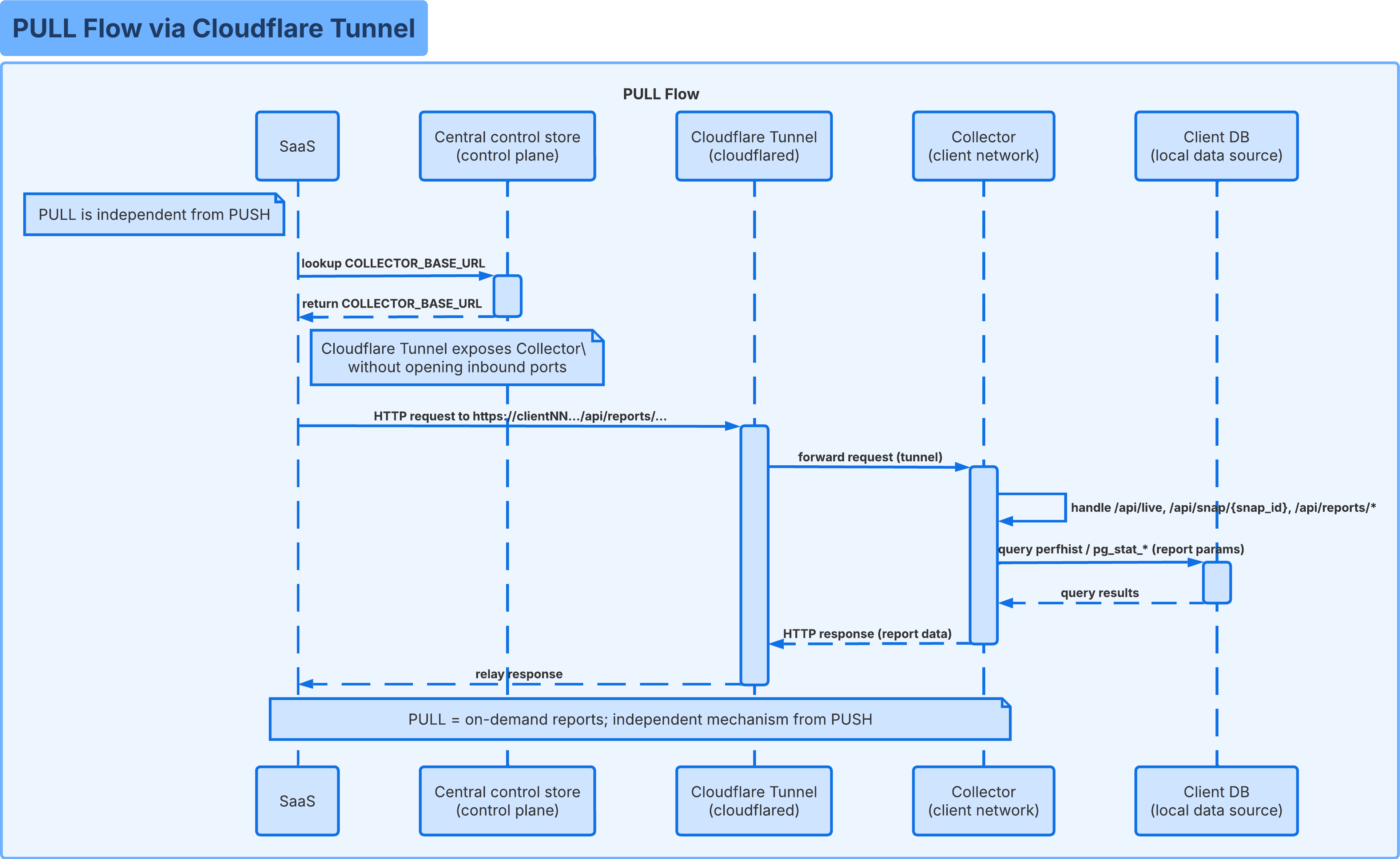
The PULL flow is independent of the PUSH flow: it is only triggered when PWR needs on-demand data, for example when a user views the live dashboard, opens a specific snapshot, or generates a comparison report from their account area.
PWR first retrieves COLLECTOR_BASE_URL from the central control store, then sends an HTTP request to https://clientNN.../api/reports/.... Cloudflare Tunnel receives this request without any inbound port having been opened on the client side, and relays it through the outbound connection already established by the Collector, all the way to its local API.
The Collector then handles the relevant route (/api/live, /api/snap/{snap_id}, /api/reports/*), queries perfhist or pg_stat_* locally with the requested report's parameters, then returns the HTTP response, which is relayed as-is back to PWR through the tunnel.
Usefulness for installation: this is the flow that feeds the live view and the reports shown in your account area without directly exposing PostgreSQL on the Internet — Cloudflare only relays bytes, it never connects to the database itself.
Flow 3 — PUSH: heartbeats and snapshots sent proactively
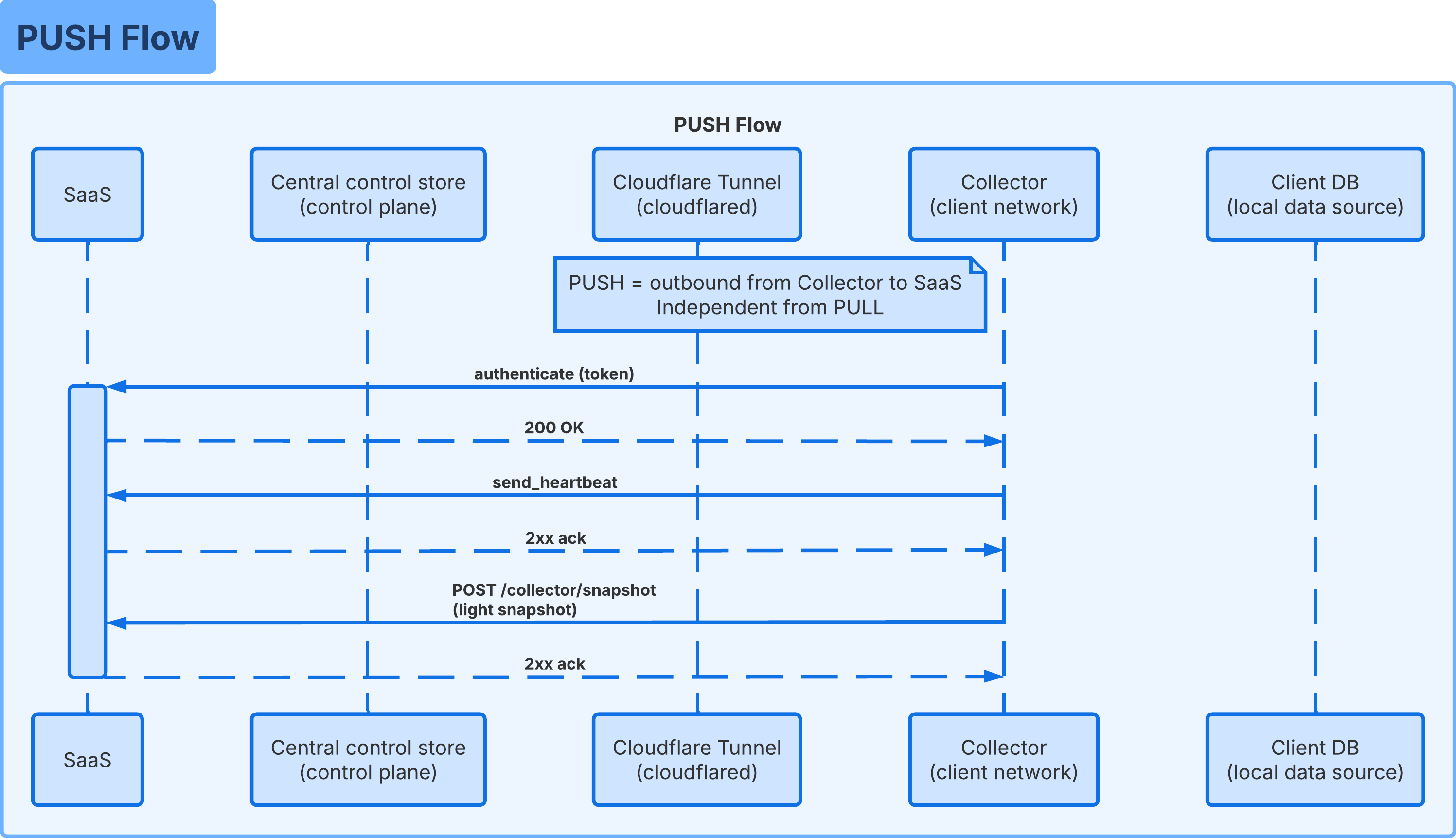
The PUSH flow is likewise independent of the PULL flow: it is the Collector that always initiates the outbound connection toward PWR, authenticating with its own Collector Token.
Once authenticated (200 OK), the Collector periodically sends a send_heartbeat (acknowledged with a 2xx) then a POST /collector/snapshot containing a lightweight snapshot, also acknowledged.
Usefulness for installation: this flow is what makes your connection show as Collector connected with an up-to-date last activity in your account area, with no inbound connection ever needed toward the client network.
Isolation of your database in all three flows
In the three diagrams above, only one arrow ever touches Client DB (local data source): the one starting from Collector (client network). Neither PWR, the central control store, nor Cloudflare Tunnel ever appear connected to the database — this is a direct result of the architecture, not just a documented best practice.
The Collector Token (Collector ↔ PWR authentication, used in PUSH) and the Tunnel Token (cloudflared ↔ Cloudflare authentication, used to establish the tunnel at Startup) are two distinct secrets: compromising one gives access neither to the other, nor to the PostgreSQL credentials, which never leave the Collector's local configuration.
Even in PULL, the Cloudflare tunnel only relays HTTP requests to the Collector's local API: it has neither the ability nor the credentials to query PostgreSQL directly.
PUSH vs PULL: what to remember
The two flows are complementary and work independently of each other: the absence of an on-demand report (PULL) never affects the heartbeats (PUSH), and vice versa.
- PUSH — initiated by: the Collector, toward PWR.
- PUSH — used for: heartbeats, connection status, lightweight snapshots sent proactively.
- PUSH — frequency: continuous, from the moment the Collector starts.
- PULL — initiated by: PWR, toward the Collector via the Cloudflare tunnel.
- PULL — used for: on-demand reports and operations (live, a specific snapshot, comparisons).
- PULL — frequency: one-off, triggered by an action in your account area.
- Common to both flows: no inbound connection is ever opened on the client network, and only PostgreSQL, never Cloudflare nor PWR, is queried directly by the Collector.