
How to change the frequency and retention period of PostgreSQL snapshots (PWR)?
6 min read
The PostgreSQL equivalent of Oracle's dbms_workload_repository.modify_snapshot_settings: how to check and change PWR's snapshot capture frequency and retention duration, in Direct mode (interface) as well as Agent mode (the Collector's config/.env file).
On the Oracle side: DBA_HIST_WR_CONTROL and modify_snapshot_settings
On an Oracle database, you check the AWR snapshot frequency and retention by querying the DBA_HIST_WR_CONTROL view (SNAP_INTERVAL and RETENTION columns), then change them with dbms_workload_repository.modify_snapshot_settings(interval => ..., retention => ...) — values expressed in minutes that you have to convert yourself (e.g. 30 days = 30*24*60 = 43200 minutes).
PWR addresses exactly the same need (keeping a usable snapshot history without overloading storage or losing the incident you're trying to analyze later), but exposes it differently depending on your connection mode: a form in the interface in Direct mode, or a simple configuration file in Agent mode — with no PL/SQL or system view query ever needed.
Checking the current configuration of your snapshots
In Direct mode, the active frequency and retention are shown directly in the "Configure capture" form of the Connections tab — no need to query a table to find them out.
In Agent mode, the same values are readable in plain text in the config/.env file, on the machine where the Collector is installed, as commented environment variables.
Changing the frequency and retention in Direct mode (interface)
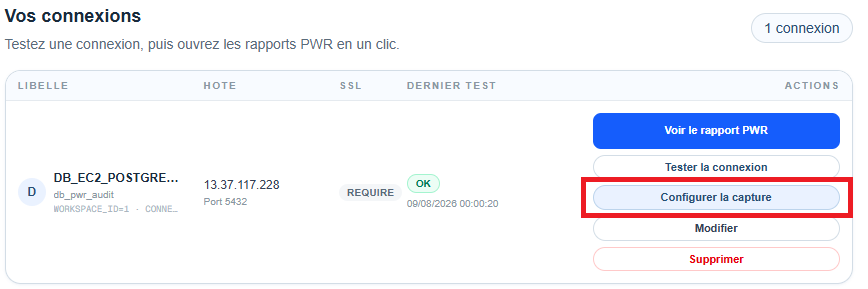
From the "Connections" tab of your account area, click the "Configure capture" button of the relevant connection.
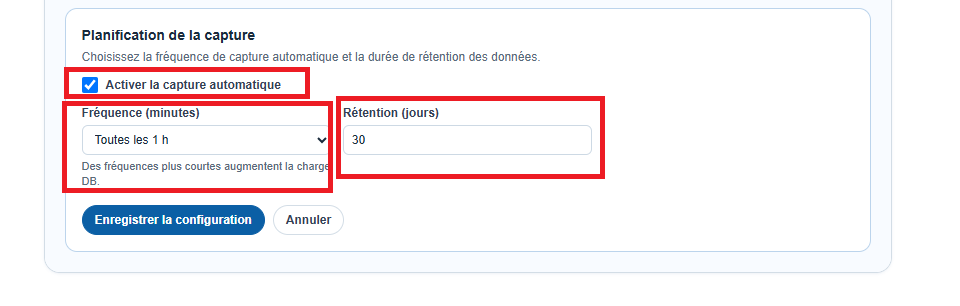
Choose the capture frequency in minutes (e.g. 15, 30 or 60) and the retention duration in days (e.g. 7 or 30), then enable automatic scheduling. The change takes effect immediately, with no restart or database-side action — PWR's internal scheduler applies the new frequency from the next cycle (checked every 30 seconds on the server side).
Changing the frequency and retention in Agent mode (Collector's config/.env)
In Agent mode, the frequency and retention don't go through the web interface but through the config/.env file, on the machine where the Collector is installed at your site. Open this file and change the two variables below.
- SNAPSHOT_INTERVAL_MINUTES — equivalent of Oracle's SNAP_INTERVAL: the interval in minutes between two automatic captures (e.g. 15, 30 or 60).
- RETENTION_DAYS — equivalent of Oracle's RETENTION: the number of days of history kept before the oldest snapshots are automatically purged.
- PURGE_BATCH_SIZE — reserved for format compatibility; it doesn't need to be changed to alter the frequency or retention.
# Interval (minutes) between two automatic captures.
SNAPSHOT_INTERVAL_MINUTES=30

# Number of retention days before purging old snapshots.
RETENTION_DAYS=30

# Reserved for format compatibility.
PURGE_BATCH_SIZE=500
Restarting the Collector to apply the change
Unlike Direct mode (applied immediately), a change to config/.env in Agent mode requires restarting the Collector service to take effect, since these values are loaded only once when the process starts.
Restart-Service PWRCollectorsudo systemctl restart pwr-collectorHow many snapshots will actually be kept?
Whether in Direct mode or Agent mode, the maximum number of snapshots kept at any given time follows the same formula: snapshots_per_day = floor(1440 / frequency_minutes), then max_snapshot = retention_days × snapshots_per_day (with a minimum of 1).
Example: a 30-minute frequency and a 30-day retention give 48 snapshots per day, i.e. 1,440 snapshots kept at most before the oldest ones are automatically purged.
Frequency and retention best practices
A frequency that's too low (e.g. 1 hour) risks "missing" a short but severe incident between two captures — conversely, a frequency that's too high (e.g. 1 minute) needlessly multiplies the stored volume without bringing useful granularity in most cases.
For everyday diagnostic use (comparing a before/after incident, tracking a trend over a few days), an interval of 15 to 30 minutes with a retention of 7 to 30 days covers the vast majority of needs. Increase the retention (60 to 90 days) if you need to be able to compare behavior several months apart (e.g. before/after a version upgrade or a seasonal peak).
Conclusion
Changing the frequency and retention of PostgreSQL snapshots with PWR requires neither a SQL query on a system view nor a PL/SQL call — just a form in the interface in Direct mode, or two environment variables in Agent mode. The result serves the same goal as dbms_workload_repository.modify_snapshot_settings on the Oracle side: keeping just enough history to diagnose a past incident, without letting the stored data volume explode.